What Is OS-Aware Phishing?

When you download a page, it usually automatically knows whether you’re on a Windows, a Mac, or a phone. That is because websites can detect what type of device you are using.
Normally, that is helpful. In OS-aware phishing, the same technology is used against you.
The phishing site identifies your operating system and changes the trap to match. Same link. Different scam.
In this blog, we’ll explain how OS-aware phishing works, how employees can spot it, and what businesses can do to stop one bad click from becoming a much bigger problem.
Let’s dive in.
What Is OS-Aware Phishing?
OS-aware phishing is a technique in which a phishing site identifies the operating system someone is using and tailors the attack accordingly.
Instead of showing every visitor the same fake page, the site checks information shared by their browser. It can then send Windows users one way, Apple users another, and mobile users somewhere else.
This does not mean the device has already been hacked. Legitimate websites also detect operating systems to display the correct page or download. The difference is that attackers use this information to choose the trap most likely to work.
What Does “OS” Mean?
OS is short for operating system. In plain English, it is what makes your phone, laptop, or computer work the way it does.
A Windows laptop runs Windows. A Mac runs macOS. Most phones use Android or iOS, while Linux is commonly found on servers and some computers.
Most people only think about their operating system when it demands an update at the worst possible time. Attackers think about it because it tells them which trap is most likely to work.
How Does OS-Aware Phishing Work?
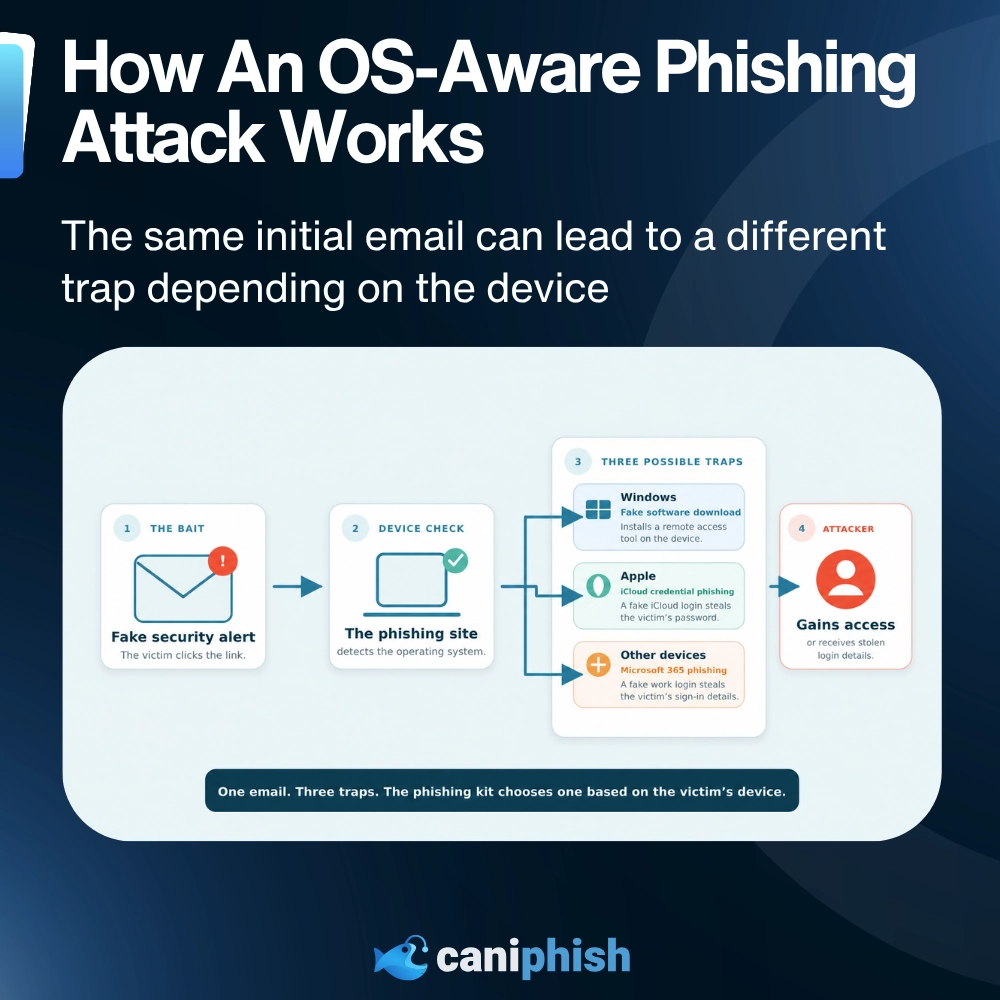
The attack starts like an ordinary phishing attempt. What happens after the click is where OS-aware phishing differs.
1. The Attacker Sends The Bait
The attacker sends an email, message, attachment, or link designed to look legitimate. It could be a security alert, shared document, missed delivery, or meeting invite.
2. The Employee Clicks
The link opens a phishing site or sends the employee through several redirects before reaching it.
3. The Site Checks The Browser
As the page loads, it reads information normally provided by the browser. This can reveal the likely operating system, browser, and device type.
4. The Site Chooses A Route
The phishing kit decides which version of the attack best matches the device.
5. The Tailored Trap Appears
The employee receives a fake login page, malicious download, or set of instructions made for their device.
One phishing link has now become several different attacks. Very efficient, unfortunately.
What Information Can A Phishing Page Detect?
The moment someone opens a phishing page, their browser may reveal more than they realize.
Depending on how the site is built, it may identify:
- The operating system and device type
- The browser being used
- The preferred language
- The screen size
- The time zone
- An approximate location based on the IP address
Seeing this information does not mean the device has already been hacked. Regular websites use some of the same details to display the right layout, language, or local content. Attackers simply use them to make the next stage of the scam more convincing.
It is less “they are inside the laptop” and more “the browser introduced you at the door.”
What Changes After Your Device Is Identified?
The phishing site may change more than the logo at the top of the page.
It can adjust:
- The branding: Microsoft for Windows users, Apple for Mac or iPhone users, or Google for Android users.
- The request: One person may be asked to sign in, while another is told to install software or run a command.
- The download: Any file offered needs to work on the device opening the page.
- The layout: Phone users may see a mobile login screen, while computer users receive a full download page.
- The backup plan: If the site cannot identify the device, it may fall back to a general Microsoft 365, Google, or company login.
OS-aware phishing does not simply swap one logo for another. It can change the entire route the attack takes.
Why Is OS-Aware Phishing So Effective?
OS-aware phishing gives attackers more value from a single campaign.
Instead of creating separate emails for Windows, Mac, and mobile users, they can send one link and let the phishing site choose what happens next. Each employee receives a trap that looks right for their device, making strange downloads or mismatched instructions less likely to give the game away.
The same setup can also help the attack avoid security tools. Automated scanners may be blocked, redirected, or shown a harmless page while a real employee sees the phishing content.
One link can target more people, look more convincing, and be harder to inspect. From an attacker’s point of view, that is annoyingly efficient.
Why Is OS-Aware Phishing Harder To Detect?
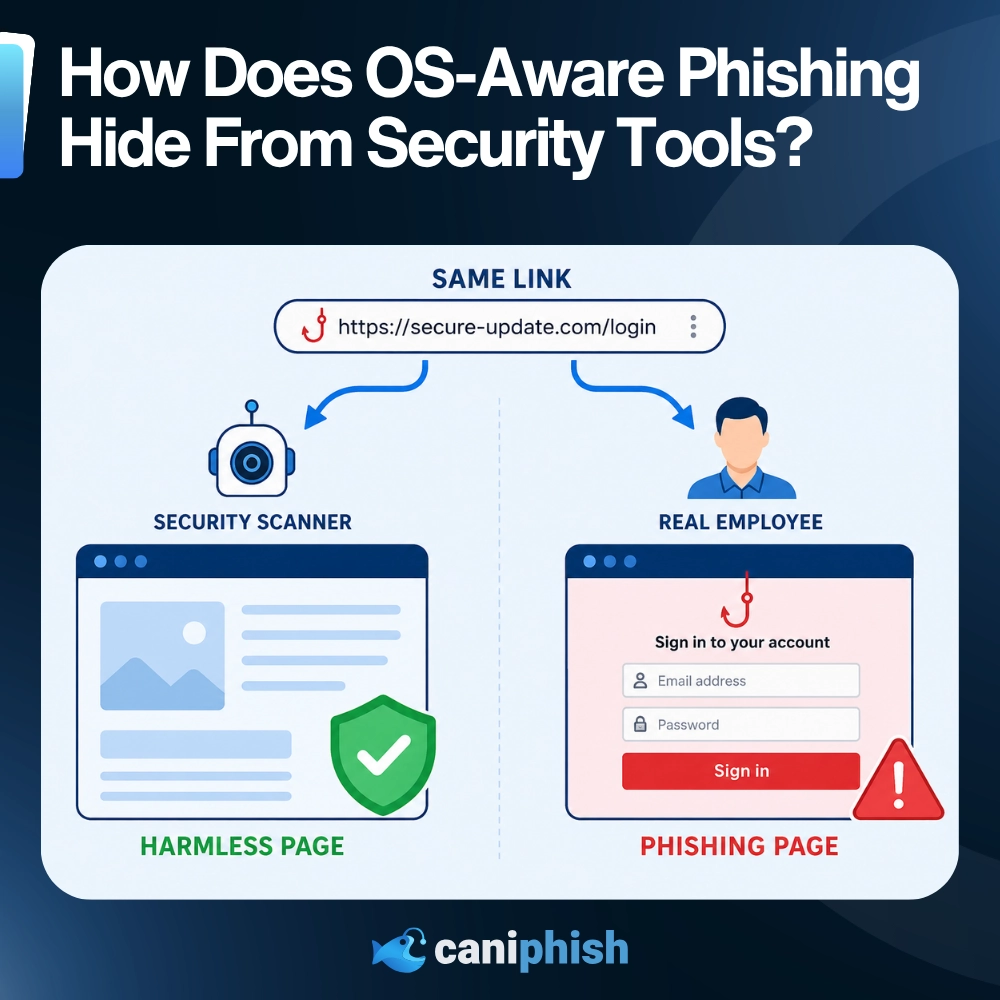
Security tools often open and inspect links before an email reaches the employee. Attackers know this, so some phishing sites are built to behave differently when a scanner comes knocking.
The link may pass through several redirects, sometimes using a trusted website or service along the way. The final page can also run anti-bot checks that look at the visitor’s browser, IP address, and activity.
If the visitor appears to be an automated scanner, the site may show a harmless page, a blank screen, or an error message. A real employee gets the phishing page instead.
The content can also change between devices. An employee opening the link on Windows may see something completely different from a security analyst checking it on a Mac.
Warning Signs Of OS-Aware Phishing
OS-aware phishing does not arrive with a helpful label saying, “We checked your laptop and selected this scam especially for you.”
Watch for:
- An unexpected warning about your device, password, or account
- A download that starts as soon as you click a link
- Instructions telling you to open PowerShell, Command Prompt, or Terminal
- A login page that appears after several redirects
- Urgent messages pushing you to act before checking
- A request to install remote-support software
One of these signs on its own does not always mean something is wrong. But if a surprise security alert asks you to install software or paste a command, stop there. Close the page and check with IT before doing anything else.
How Can Businesses Prevent OS-Aware Phishing?

Employees do not need to work out which operating system a phishing page is designed for. If an unexpected alert claims there is a problem with an account, they should skip the link and check through the real app or website instead.
If a website suddenly asks someone to download software or follow unusual technical instructions, that should set off alarm bells. Close the page and report the original message to IT.
Businesses should also check where links eventually lead, as the first page may appear harmless. Endpoint protection can help catch suspicious downloads and unauthorized software. Businesses should also block remote-access tools they do not use or approve.
Suspicious links should also be checked across different devices and browsers. A page that behaves itself on a Mac may show its true colors on Windows.
Finally, phishing simulations should include Apple alerts, mobile login pages, unexpected downloads, and fake support requests. If every simulation looks like the same Microsoft login page, employees may become excellent at spotting the test and not much else.
Frequently Asked Questions
Can A Website Really Detect My Operating System?
Yes. A website can usually make a good guess based on information supplied by your browser. This may include the operating system, browser, device type, screen size, and language.
This happens on legitimate websites too. It is why a download page can offer the Windows version before you have told it which computer you own.
Does OS-Aware Phishing Automatically Infect Your Device?
Not necessarily. OS-aware phishing describes how the attack changes to suit the device, not how the device becomes infected.
Many attacks still need the employee to download a file, install software, paste a command, or enter login details. Simply opening the page may only begin the attack. If the page seems suspicious, close it without downloading anything or entering your details.
Are Mac And iPhone Users Safe From OS-Aware Phishing?
No. Attackers can serve fake Apple sign-in pages, malicious macOS downloads, mobile credential traps, and instructions designed for Apple devices.
Is OS-Aware Phishing The Same As Browser Fingerprinting?
Not quite. Browser fingerprinting gathers details about a visitor’s browser and device.
OS-aware phishing uses some of that information to decide which phishing page, download, or instructions the visitor receives. Fingerprinting collects the clues. The phishing kit decides what to do with them.
Can Security Software Detect OS-Aware Phishing?
Yes, but it may not catch every attack. Some phishing pages block automated scanners or show them harmless content while saving the real page for employees.
Email filtering, browser protection, endpoint controls, and employee reporting all help cover the gaps.

Explore the future with these AI-inspired films
Check out our countdown of the top 45 AI movies to watch in 2026
Find out who takes the top spot!
An Operations Analyst on a mission to make the internet safer by helping people stay a step ahead of cyber threats.