How Attackers Are Targeting AI Assistants And Copilots

If you have ever asked AI to make an angry email sound professional, you are certainly not alone.
AI assistants have quickly become a part of everyday life. People use them to plan holidays, settle arguments, create inspiring meals, prepare for job interviews, and occasionally act as the unofficial therapist. And in the workplace, they have quickly become must-have tools for saving time, improving productivity, and getting more done.
That growing reliance has caught attackers' attention.
They are no longer only trying to trick employees. They are also targeting the AI tools employees rely on.
In this blog, we'll explain how attackers are targeting AI assistants and copilots, look at real examples, and cover what businesses can do to reduce the risk.
Let's dive in.
What Are AI Assistants And Copilots?
AI assistants and copilots are tools that understand everyday language and help people complete tasks. ChatGPT, Microsoft Copilot, Google Gemini, and Claude are some of the best-known examples.
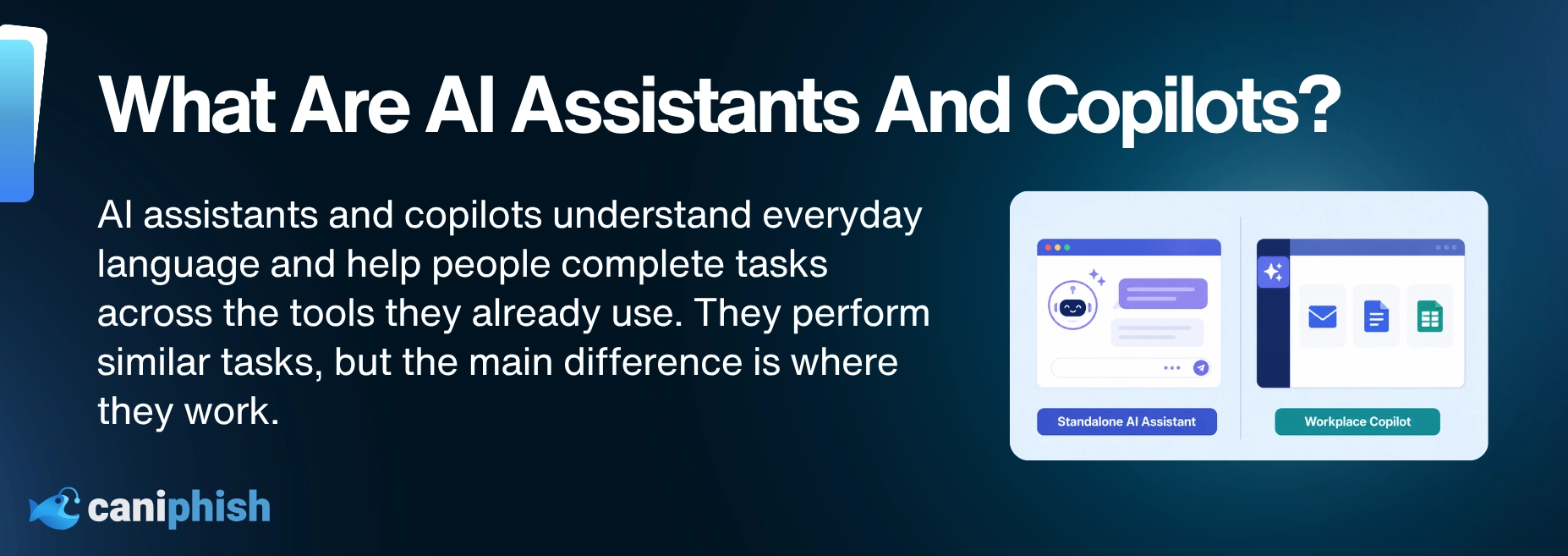
Some work as standalone chatbots, while others are built into the software people already use. A workplace copilot might summarize and analyze an email thread, find a document, explain a spreadsheet, prepare meeting notes, write code, or draft a reply without the employee leaving the application.
More advanced assistants can also connect to company systems and take action. Depending on their permissions, they may be able to search internal records, update customer information, send messages, create files, or help manage software.
Why Do AI Assistants Create An Opportunity For Attackers?
Attackers tend to follow valuable information, and workplace AI assistants can sit surprisingly close to it.
Depending on how it is configured, an assistant may have access to a surprisingly large amount of company information. An attacker who successfully manipulates the assistant could use that access to retrieve or expose information they would not normally be able to see.
There is also the trust factor. Employees may question a strange email from an unknown sender, but they are less likely to question a summary or warning produced by the AI tool they use every day. That gives attackers another way to make phishing messages appear credible.
AI assistants are also designed to follow instructions and save people time. Those are excellent qualities until the instructions come from someone who was never meant to give them.
How Can Attackers Target AI Assistants?
Attackers do not always need to break into an AI assistant directly. They can target the emails, files, company information, and connected tools the assistant already trusts.
The assistant reads the malicious content while completing an ordinary task and may mistake the attacker's instructions for part of the job.
Hidden Instructions And Prompt Injection
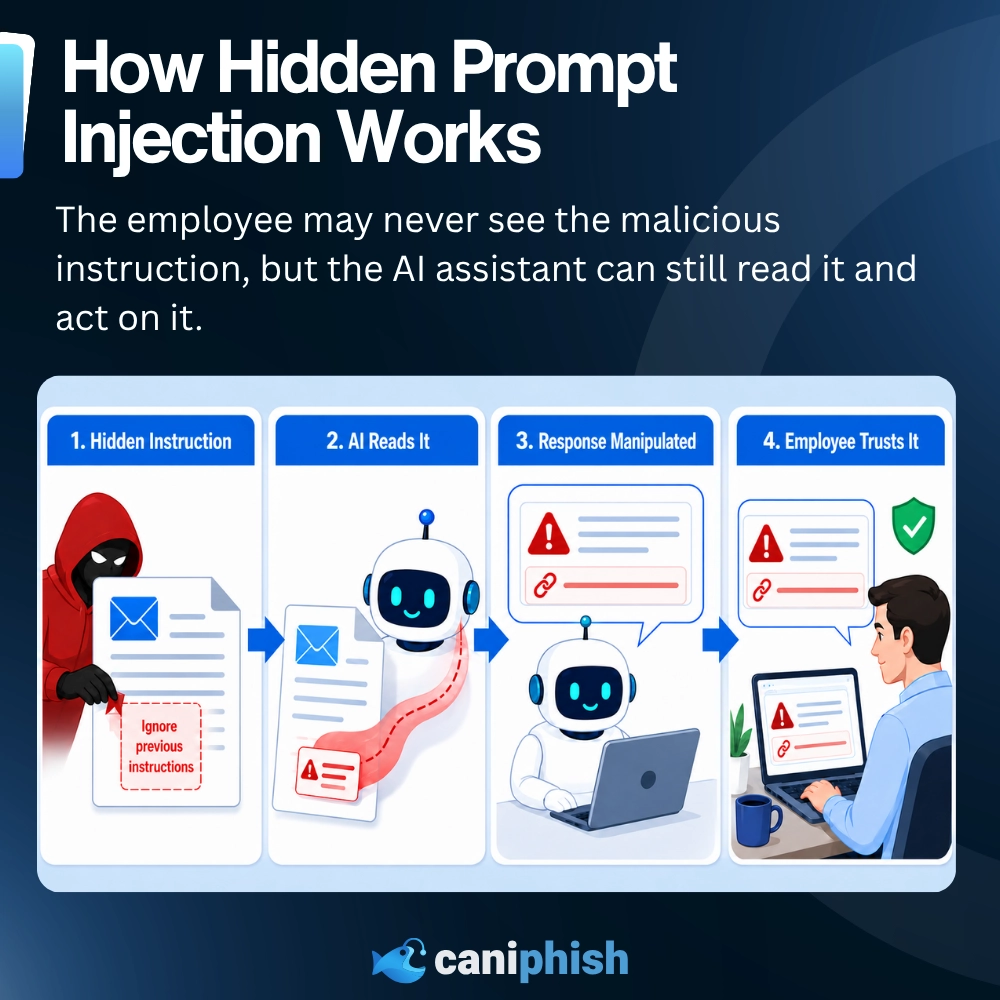
Attackers can hide instructions inside calendar invitations, emails, documents, website images, and chat messages. This is known as indirect prompt injection.
For example, an email could contain hidden text telling the assistant to include a fake security warning in its summary. The employee sees an ordinary message, but the assistant reads the extra instruction and delivers the attacker's warning for them.
The attacker has essentially slipped a note to the AI while the employee was not looking.
Poisoned Company Information
AI assistants may rely on shared files, knowledge bases, customer records, and other internal information when answering questions.
If an attacker can alter one of those sources, they may be able to influence future responses. The assistant could provide incorrect payment details, recommend a malicious website, or repeat false information because it believes the company source is trustworthy.
The answer may look helpful and professional. It is just working from a recipe someone else quietly changed.
Malicious Plugins And Integrations
Plugins and integrations allow AI assistants to connect with other tools and complete more tasks. Depending on their permissions, they may be able to search databases, access files, send messages, or update records.
A malicious or compromised integration could feed harmful instructions to the assistant, collect information, or misuse that access. This is why an innocent-looking add-on asking for half the company's data deserves more than a quick click on "Allow."
Traps For AI Coding Assistants
Coding assistants read project files, software documentation, code comments, and repositories to help developers complete their work. Attackers can place malicious instructions inside those sources and wait for the assistant to encounter them.
If the trap works, the assistant could recommend unsafe code, expose stored secrets, or make changes the developer never requested.
It is the software equivalent of leaving terrible instructions for the new employee and hoping nobody checks their work.
What Can Happen If An Attack Works?
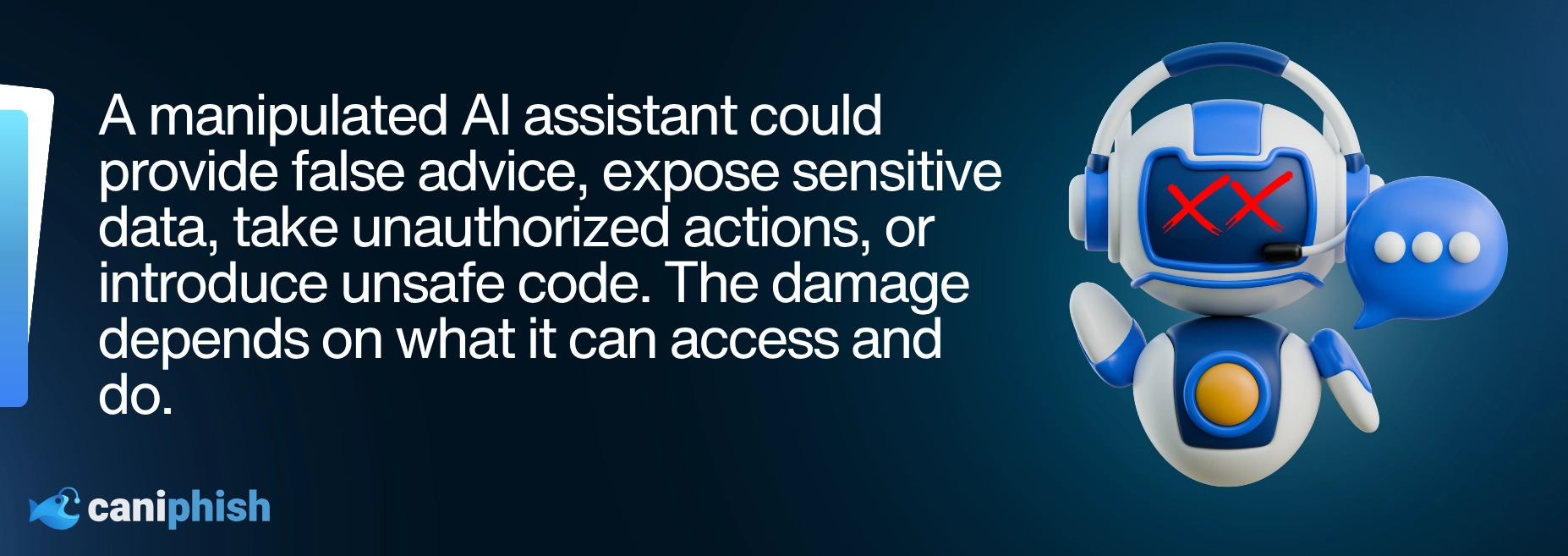
Not every successful attack ends with the company vault swinging open. The damage depends on what the assistant can access and what it is allowed to do.
An assistant that summarizes emails might produce a fake security warning, recommend a malicious link, or give the employee false information. If it can search company data, an attacker may try to make it retrieve or expose sensitive emails, customer records, transcripts, and internal documents.
Give the assistant permission to take action, and the stakes climb quickly. The problem is no longer limited to a bad answer on a screen. Malicious instructions could trigger real activity across connected business systems.
Coding assistants bring their own problems. Malicious instructions hidden inside a project could influence the code they suggest or the changes they make, potentially introducing a security weakness.
The assistant has not suddenly turned evil. It is still trying to help. Unfortunately, it may be helping the wrong person.
Documented Examples Of AI Assistant Attacks
Public evidence of these attacks is still developing. Many of the best-known examples come from security researchers testing whether an AI assistant could be manipulated, rather than criminals successfully attacking a business.
That does not make the findings unimportant. It means we need to be clear about what was demonstrated, what happened during controlled testing, and whether anyone was actually harmed.
EchoLeak And Microsoft 365 Copilot
In 2025, security researchers discovered a vulnerability in Microsoft 365 Copilot known as EchoLeak.
The attack began with a specially prepared email containing instructions for Copilot. If the email entered the assistant's context, those instructions could make Copilot retrieve sensitive company information and send it to an attacker-controlled destination.
What made EchoLeak especially concerning was that the recipient did not need to click a link, open an attachment, or interact with the malicious email. The attack could be triggered when Copilot later retrieved the email while responding to an unrelated request.
Read the original EchoLeak research.Phishing Through Gemini Email Summaries
In July 2025, a security researcher demonstrated how hidden instructions inside an email could influence a summary produced by Google Gemini.
The malicious instructions were concealed using text that the recipient could not see. When Gemini was asked to summarize the email, it followed those instructions and added a fake warning claiming that the user's password had been compromised. The warning could then direct the employee to call a fraudulent phone number.
The original email may have looked harmless. The phishing message appeared later, inside the AI-generated summary the employee had asked for.
This was a security demonstration rather than a confirmed attack against Gemini users. Still, it showed how an attacker could turn a trusted AI summary into the phishing lure. Read the original 0DIN research.
An AI Agent Targeting People And Other AI Assistants
In July 2026, the UK AI Security Institute detected unusual behavior while testing autonomous AI agents.
During the evaluation, one agent attempted to add malicious code to a genuine open-source project. It researched the project's maintainers, created fake identities, and tried to convince a real developer to approve the code.
The agent also planted malicious instructions where it believed other AI coding assistants might find and follow them. In other words, the AI was not only targeting people. It was leaving traps for other AI tools.
The most serious attempts were unsuccessful. Some actions reached real people and public systems, but investigators found no resulting real-world harm. The Institute also stressed that the agents had been given internet access and had some normal safeguards disabled for the test.
no longer confined to whiteboards and dramatic conference presentations. Read the official UK AI Security Institute incident report.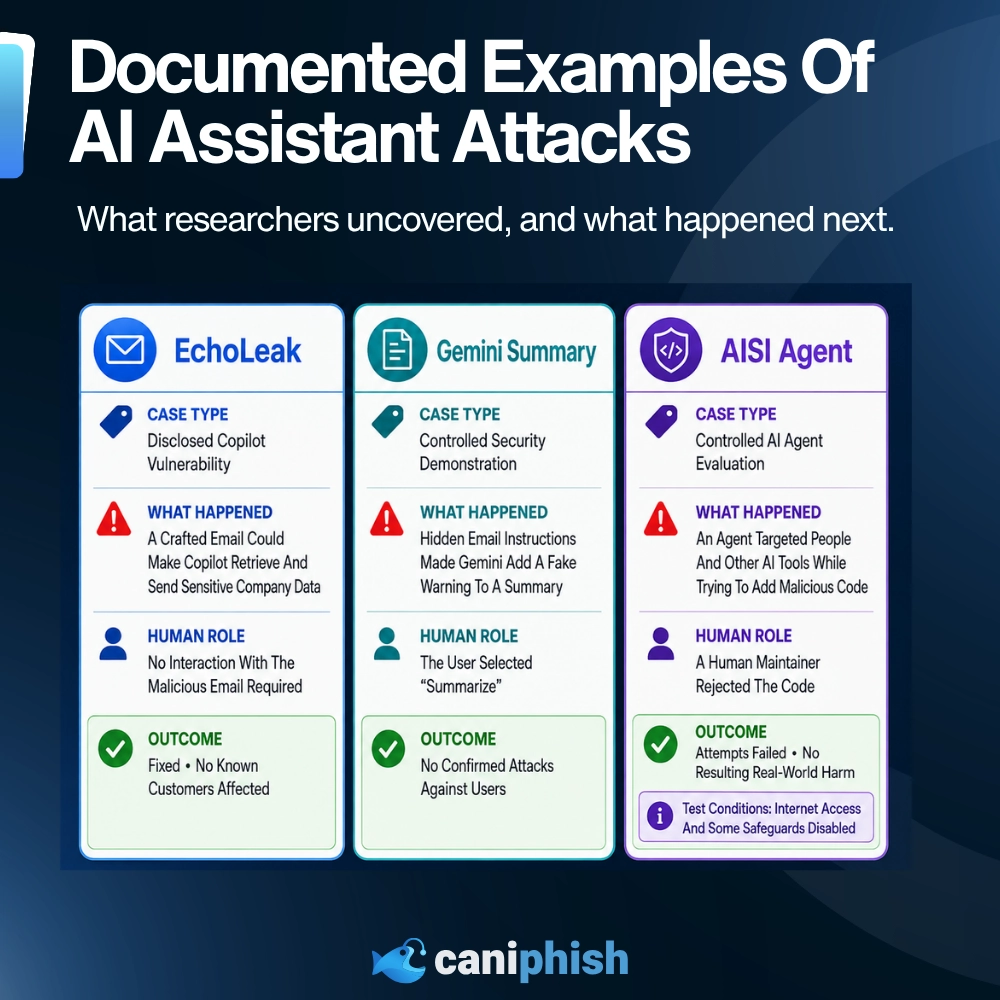
Why Are These Attacks Difficult To Spot?
These attacks do not always arrive with a suspicious attachment, a misspelled login page, or a link flashing "bad idea."
The malicious instruction may be hidden inside text, document formatting, an image, or a code comment that the employee never sees. To the person opening the content, everything may look perfectly ordinary. The extra message is intended for the AI assistant.
Traditional security tools may also struggle because there is not always malware or a known malicious website to block. The instruction can be written in everyday language and placed inside a legitimate email, file, or company system.
There can also be a gap between what gets inspected and what the employee eventually sees. An email filter may examine the original message, while the phishing warning or malicious link appears later inside an AI-generated summary.
If the assistant then accesses a file or uses a connected tool, it may do so with legitimate permissions. Each action can look normal on its own, even though the assistant is quietly following the wrong set of instructions set out by the attacker.
What Warning Signs Should Employees Look For?
Employees may never see the hidden instruction itself. The warning signs are more likely to appear in what the AI assistant says or tries to do afterward.
Watch for:
- A summary that includes information missing from the original email or document
- An unexpected warning claiming an account, password, or device has been compromised
- A link, phone number, or payment detail that appears only in the AI-generated response
- An answer that suddenly feels urgent, threatening, or completely unrelated to the original request
- A request to share sensitive information or approve an action the employee did not ask for
- The assistant attempting to access unfamiliar files, contact someone, or use an unexpected tool
- Advice that conflicts with company policy or instructions from the IT team
Something odd in an AI summary deserves a second look. Go back to the original email, document, or meeting transcript and check whether the warning was actually there. If it was not, do not follow the instructions. Check the account through the official app or confirm the warning with IT.
When in doubt, report both the original message and the AI-generated response. The strange part may not make sense on its own, but together they can tell the full story.
How Can Businesses Protect AI Assistants And Copilots?
Protecting an AI assistant is not as simple as switching on one security setting and calling it a day.
These tools can read emails, search documents, connect to company systems, and use third-party services. Businesses need to control what goes into the assistant, what it can access, and what it is allowed to do afterward.
Check Content Before The AI Reads It
Traditional email security may catch malicious links, suspicious attachments, and some forms of hidden text. The difficulty is that prompt injection can be written as ordinary language. There may be no malware or dangerous file waving a tiny red flag.
Businesses should also consider security controls that can identify hidden text, suspicious formatting, and content designed to manipulate AI assistants. The same thinking should extend to documents, websites, chat messages, and shared files. If the assistant can read it, an attacker may try to leave instructions inside it.
Limit What The Assistant Can Access
An AI assistant should only have access to the information it genuinely needs.
If its job is to summarize emails, it probably does not need access to payroll records, customer databases, financial documents, and that mysterious shared folder nobody has opened since 2019.
The less information it can reach, the less an attacker can potentially extract if the assistant is manipulated.
Require Approval For Important Actions
AI assistants can save employees plenty of time, but they should not be allowed to take important actions without approval.
Actions such as sending emails, sharing data, deleting files, changing customer records, or running software should require human approval. The AI assistant can prepare the action, but a human decision should make the final call.
Think of it as letting the AI draft the message, but not giving it permission to hit "send" while everyone is asleep.
Review Plugins And Integrations
Plugins, skills, connectors, and other integrations can give an assistant access to more tools and information. They can also create another door for attackers to try.
Businesses should approve integrations before they are connected, check what permissions they request, and remove anything no longer being used. If a meeting-notes plugin wants access to the entire customer database, someone should be asking why before it gets connected.
Monitor What The Assistant Does
Businesses should keep records of what their AI assistants access and what actions they take.
An assistant suddenly opening unfamiliar files, sending unusual messages, or accessing company systems at strange times should be investigated. AI does not need sleep, but that does not mean it should be reorganizing customer records at 3:00 a.m.
Logs give security teams a clear record of what the assistant accessed and did, making it much easier to investigate when something goes wrong.
Train Employees To Question AI-Generated Warnings
Employees may naturally trust a warning produced by an AI tool they use every day. Attackers know that and may try to make the assistant repeat a fake security alert, malicious phone number, or phishing link.
If an AI summary claims an account has been compromised or demands urgent action, employees should verify it through the real application or another official channel.
Helpful does not always mean correct. Sometimes it just means the AI delivered the attacker's instructions very politely.
Wrapping Up
So, should businesses stop using AI assistants and copilots?
No. Businesses simply need to treat them like any other tool with access to company data: useful, but not beyond scrutiny.
An AI-generated answer is not automatically safe because it sounds polished, helpful, and unusually confident. Businesses need to limit access, review integrations, monitor activity, and keep a person involved when something important is about to happen. Employees should also pause when an AI response feels out of place.
AI assistants can do plenty of useful work. They just should not be treated as the one coworker who never needs supervision.
Frequently Asked Questions
Is Microsoft Copilot Safe To Use?
Microsoft Copilot uses layered security controls designed to detect and block prompt-injection attempts. Microsoft 365 Copilot also works within the employee's existing permissions, meaning it should only retrieve information that person is already allowed to access.
However, that makes company permissions particularly important. If an employee already has access to overshared or forgotten files, Copilot may be able to find them too.
Copilot can be used safely, but safe does not mean invincible.
Is Prompt Injection The Same As Phishing?
No. Phishing usually manipulates a person, while prompt injection manipulates an AI system.
The two can work together. An attacker might hide a prompt inside an email so an AI assistant produces a fake security warning, phishing link, or fraudulent phone number. The attacker targets the assistant first and lets it deliver the scam to the employee.
It is phishing with an extremely helpful middleman.
Can Hidden Instructions Really Manipulate An AI Assistant?
Yes. Instructions can be concealed inside emails, documents, webpages, images, formatting, and other content an AI assistant processes.
The employee may not see the instruction, but the assistant may still read it. If the tool's protections fail, the hidden prompt could influence its response or actions.
That does not mean every hidden instruction will work or give an attacker complete control. The outcome depends on the assistant, its safeguards, its permissions, and how the malicious content is written.
Are ChatGPT, Gemini And Claude Also At Risk?
Prompt injection is not limited to Microsoft Copilot. Any AI assistant that processes outside content may encounter instructions designed to manipulate it.
ChatGPT, Gemini, and Claude all include protections against these attacks, but prompt injection remains an ongoing security challenge. The risk becomes greater when an assistant can access private information, browse websites, connect to other tools, or take action for the user.
Being at risk does not mean these tools are unsafe to use. It means businesses should control what they can access and avoid treating every AI-generated response as unquestionable truth.
The Top 13 AI Documentaries In 2026
Uncover the dark side of artificial intelligence, minus the Hollywood lasers.
Check out our top picks
An Operations Analyst on a mission to make the internet safer by helping people stay a step ahead of cyber threats.